
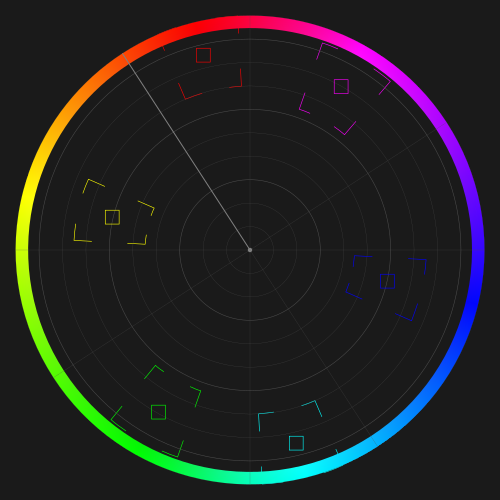

Video Vectorscope is a color analysis tool designed for motion content. It interprets user input and applies those adjustments across frames, allowing precise control over hue, saturation, and overall color balance in video. The vectorscope display provides a continuous, real-time view of how color information evolves as footage plays.
Unlike still images, video introduces the added complexity of time. Colors must remain consistent not only within a single frame but across entire sequences. The vectorscope helps visualize this continuity, making it easier to identify shifts, imbalances, or inconsistencies that may not be obvious during playback.
Historically, vectorscopes were used in broadcast and film environments to maintain uniform color across scenes, cameras, and lighting conditions. In modern workflows, they remain essential for ensuring that cuts between shots feel seamless and that colors remain stable throughout a clip.
A vectorscope offers a secondary perspective on your footage. It does not replace what you see—it complements it. You can push colors aggressively to create stylized looks, or apply subtle corrections to improve realism and cohesion across scenes.
Practical Guidelines for Video Color Work
- Prioritize the footage, not the graphThe video itself carries the narrative. The vectorscope is a diagnostic tool, not the end goal. If the image looks wrong, adjusting the scope alone will not correct it.
- Maintain consistency across frames and shotsIn video, small color shifts between cuts can be distracting. Use the vectorscope to keep hues and saturation aligned from shot to shot, especially for skin tones and neutral areas.
- Preserve tonal anchorsWhites and blacks define contrast and realism. Even in stylized grading, maintaining a stable tonal range helps the image feel intentional and controlled.
- Watch motion behaviorAs footage plays, observe how the vectorscope trace moves. Sudden jumps or drifting patterns can indicate instability in color balance or exposure.
- Favor incremental adjustmentsLarge corrections can introduce artifacts or inconsistency over time. Subtle, controlled changes typically produce more natural and reliable results across an entire clip.
The vectorscope translates complex color data into a simple geometric form, allowing you to monitor and refine your video with clarity. Its role is not to dictate creative choices, but to provide insight—ensuring that what you intend is what the viewer ultimately sees.